Tezza: Aesthetic Editor
- 3.7
- Rating
- 5.00M
- Installs
- Free
- Price

 Analysis by App-foxy
I came away from Tezza with a fairly clear impression: it is a style-first photo editor that makes ordinary pictures feel more intentional, especially when you want a soft, nostalgic, or editorial look without spending much time adjusting every control. I would recommend it to someone who wants a recognizable visual mood for photos and short videos, not to someone searching for a complete professional editing workstation.
That distinction matters. The app is free to install, and the developer is Tezza, but parts of the experience are supported by in-app purchases ranging from $1.99 to $39.99 per item. In my experience, the free starting point is useful for understanding the editing approach, while the broader appeal comes from exploring the paid creative options. The result is attractive when your taste matches its polished, 90s-inspired direction, but less convincing if you prefer neutral corrections or highly technical control.
What makes the editing experience stand out
The strongest part of this photography app is how quickly it helps me make a group of images feel related. Instead of beginning with exposure, contrast, color temperature, and several separate adjustment panels, I can start with a visual direction and then make smaller corrections. That is particularly useful for a casual photo set, a travel diary, a personal mood board, or a social post where consistency matters more than perfect technical accuracy.
You May Also Like

 Google Keep - Notes and lists
Google Keep’s Quiet Growth Shows the Appeal of Simpler Notes
As mobile work gets busier, Google Keep keeps winning a simple contest: capture a thought quickly, find it later, and get on with the day.

 Blood Strike: 2.5 Anniversary
Blood Strike’s Loadouts Turn Every Drop Into a Tactical Gamble
A close look at Blood Strike’s custom loadouts: how fast access to signature weapons reshapes its battle royale rhythm, rewards preparation, and narrows the gap between fights.

 Pandora - Music & Podcasts
Pandora’s Music Is Easy to Start, but Harder to Recover
Pandora’s strength is its low-effort path from a seed to a station. Its weak spot is how much confidence it asks you to place in connection, setup, and quiet recovery.

 8 Ball Pool
 Is Built on Rivalries, Rematches, and Routine
A close look at the rivalries, rematches, shared routines, and unanswered safety questions that turn a quick pool match into a persistent mobile community.

 Samsung Music
’s Quiet Strength Is Playing What You Already Own
Its reach comes less from spectacle than from dependable access to a personal library. That simplicity is both the app’s strongest retention engine and its ceiling.

 AccuWeather: Weather Radar
AccuWeather Review: A Quick, Clear Forecast for Everyday Decisions
For everyday plans, the best forecast is the one you can understand quickly. AccuWeather makes rain timing, radar, and local conditions easy to act on, with a few trade-offs.
More From Our News Desk



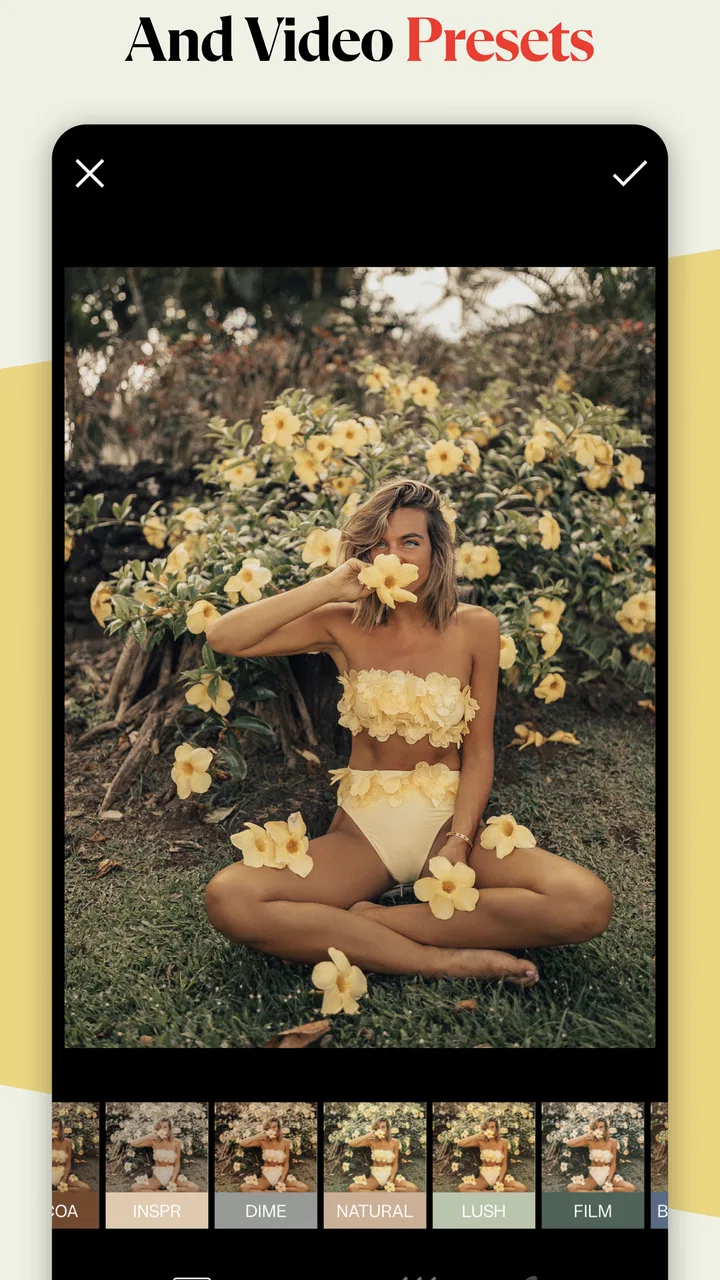
The preset-led approach also changes how I judge a picture. A flat indoor shot may look uninteresting in the phone gallery, yet a warmer treatment, faded color, or stronger grain can give it a deliberate character. I would not use that transformation blindly, because a filter can easily hide skin detail or push shadows too far, but the app encourages experimentation in a way that feels less intimidating than a traditional editor.
Its focus on both pictures and videos is another meaningful strength. Many mobile editors are excellent for still images but feel awkward when I want the same visual identity on a clip. Here, the appeal is the possibility of treating a small collection as one project: a still from a birthday, a short café video, and a street photograph can be brought closer together rather than looking like unrelated files from different days.
That workflow is especially handy for someone who posts irregularly. I can choose a few images, apply a similar starting style, and then reduce the effect on the frames that need a lighter touch. My practical tip is to edit the strongest image first, save that look mentally, and use it as a reference for the rest. Applying the same intensity to every file often produces a less natural result because lighting and skin tones vary from shot to shot.
The app’s aesthetic direction is more specific than the broad label of “photo editor” suggests. It leans toward expressive, nostalgic presentation rather than invisible correction. That makes it enjoyable when I want a photograph to feel like part of a visual story. It is less suitable when my goal is simply to remove a color cast, recover detail from a difficult exposure, or prepare a product image that must remain faithful to the original.
Presets work best as starting points, not finishing buttons
I found the best results came from treating a preset as a first decision rather than a final answer. A strong look can make a portrait feel atmospheric, but it can also deepen facial shadows or turn a neutral wall yellow. After choosing a style, I would check the brightest area, the darkest corner, and the subject’s skin before deciding whether the image was actually finished.
This is one of the app’s less obvious trade-offs. Its visual personality can save time, but that personality can also tempt me to prioritize mood over accuracy. For personal images, that is often a good exchange. For images where color needs to be dependable, I would use a more correction-focused editor and bring the finished result here only if I wanted a final stylistic treatment.
A useful routine is to compare the edited image with the original after taking a short break. When I stare at a dramatic filter for too long, it starts to feel normal. Looking again at the unedited version helps me notice whether the effect improved the photograph or merely made it louder. This small habit is more valuable than endlessly trying presets because it keeps the subject in charge of the style.
The same principle applies to video. A look that works on a still frame may feel excessive once the image is moving. Changes in daylight, indoor lighting, and camera exposure become more obvious across a clip. I would preview a video from beginning to end before exporting rather than judging it from one attractive moment. That extra check helps prevent a treatment that looks good at the start but becomes distracting later.
Where it fits beside ordinary mobile alternatives
Compared with a general-purpose phone editor, this app feels faster when I already know the mood I want. Standard gallery tools are usually better for simple cropping, rotation, brightness correction, and quick cleanup. They are also convenient because they are already part of the phone workflow. Tezza earns its place when I want a more recognizable visual signature and do not want to build that look manually every time.
Compared with a highly technical mobile editor, it is more approachable but less suited to careful, layered work. A professional-style alternative may offer deeper control over individual colors, masks, local adjustments, or complex retouching. That can be the better choice for photographers who want to refine one image for a long time. I prefer this app for speed and atmosphere, while I would choose the technical option when precision is the main requirement.
It also differs from social platforms that apply a quick filter during posting. A dedicated editor gives me more room to decide what the image should look like before it reaches a feed. That separation is useful because I can compare several pictures together and avoid making an important visual decision in the middle of publishing. The trade-off is another step in the process, which may feel unnecessary for someone who only wants an occasional casual snapshot.
A realistic everyday workflow
Imagine I spend an afternoon walking through a market with a few friends. I have bright outdoor photographs, a dim café portrait, and a short video of the street. The original files do not share the same lighting, so posting them together would look disjointed. I would first select only the images that belong to the same small story, choose a restrained preset direction, and then adjust each file individually instead of forcing identical intensity across the set.
For the portrait, I would keep the face readable and watch the darker areas around the eyes. For the market photographs, I might allow more faded color if it supports the atmosphere. For the video, I would check transitions between shade and sunlight. The point is not to make every file identical; it is to make them feel like they belong together. That is where the app’s style-driven workflow becomes more valuable than a collection of unrelated one-tap filters.
I would also export a test version before finishing the entire set. This is a practical way to catch a look that seemed subtle while editing but becomes too strong outside the editor. It saves time and helps me decide whether the chosen treatment works across different subjects, not just on the one image that looked best in the selection screen.
The limitations I would consider before installing
The first limitation is the app’s narrow aesthetic center. If you dislike faded tones, retro color, visible texture, or deliberately stylized images, you may find the experience repetitive even if the editing tools themselves are well presented. The app does not need to suit every photographic taste, but its identity is strong enough that it should be part of the buying decision.
The second issue is the relationship between the free app and paid content. Since it can be installed without an upfront charge but includes individual purchases, I would not assume that every appealing option is available immediately. Someone who wants a broad library or a particular look should explore the free experience first and decide whether the available creative direction justifies spending more. This is not a reason to reject it, but it does make the app better suited to users who know they enjoy its style.
The average rating is 3.7 from around 13 thousand ratings, with over 200 written reviews shown in the store. I read that as a sign to keep expectations realistic rather than as a simple verdict. A style-focused editor can be excellent for one person and disappointing for another because the desired result is subjective. The large install figure, over 5 million, suggests that the concept has broad reach, but popularity does not remove the need to check whether its look matches your own.
Compatibility is also worth checking before planning a workflow. The app supports Android 7.0 and later, and the current version is 3.40.3. That makes it accessible across many older Android devices, although the editing experience can still depend on the phone’s screen, storage situation, and general performance. I would keep some free space available before working with several videos, especially if I intend to save multiple versions while comparing styles.
Another point is that this is not the app I would choose for serious image repair. If a photograph needs extensive object removal, detailed masking, careful perspective correction, or highly controlled color work, a more specialized editor is likely to be more efficient. Tezza can give a finished image a mood, but mood and restoration are different jobs. Trying to make it perform both can turn a quick edit into a frustrating one.
Who will enjoy it most
I think the best audience is someone who wants a coherent personal look without learning a full technical editing system. That includes people building a visual diary, creators preparing short lifestyle clips, and anyone who prefers choosing from a curated-feeling aesthetic direction instead of adjusting dozens of sliders. It is also a good fit for users who care about the relationship between still images and video rather than treating them as separate kinds of content.
It may also suit a beginner who feels overwhelmed by conventional editing apps. Starting with a visual idea gives the beginner something concrete to evaluate: warmer, softer, darker, cleaner, or more nostalgic. From there, small changes become easier to understand. I would still encourage new users to learn what each adjustment changes, because relying entirely on one-tap results can make images look similar over time.
I would steer professional photographers, online sellers, and anyone needing strict color consistency toward another main editor. The same applies to people who want extensive free functionality and feel uncomfortable encountering paid options during exploration. A different tool may offer a wider neutral toolkit or a more transparent technical workflow. Tezza is strongest when its creative taste is part of the appeal, not when the user wants the app to stay invisible.
For families and casual users, the Everyone age rating makes it broadly approachable, but that does not mean every feature will be equally useful to every person. A parent organizing everyday memories may prefer the phone’s built-in editor for speed. A teenager or creator shaping a recognizable feed may get much more from the app’s visual consistency. The right choice depends less on skill level than on whether style is central to the editing goal.
My final recommendation
After using it as a style-led editor, I see Tezza as a focused creative tool rather than an all-purpose replacement for every photo app. Its best quality is the way it turns a scattered collection of photos and clips into something with a shared mood. It reduces the distance between “I want this to feel nostalgic” and a usable result, while still leaving room for personal judgment.
The main caution is equally clear: the app’s personality can become a limitation. If you want exact corrections, broad retouching control, or a completely neutral starting point, another editor will probably serve you better. If you enjoy expressive presets and are willing to adjust them instead of accepting every effect at full strength, the experience is much more rewarding.
I would install it for personal projects, travel sets, portraits where atmosphere matters, and short videos that need to sit comfortably beside still images. I would begin with the free experience, test the look on several different kinds of photographs, and only then consider the available purchases. My recommendation is positive for aesthetic-minded users who value speed and consistency, but conditional for anyone who needs technical precision first.
FAQs for Tezza: Aesthetic Editor
01What is Tezza: Aesthetic Editor used for?
Tezza: Aesthetic Editor is a photo and video editing app designed for creating polished, stylish social media content. It combines filters, presets, grain, dust, light leaks, VHS-inspired effects, collage tools, text, borders, and adjustment controls in one interface. The app is particularly suited to users who enjoy trendy, editorial, vintage, or carefully coordinated aesthetic edits rather than basic image corrections alone.
02Is Tezza: Aesthetic Editor free to download and use?
Tezza can generally be downloaded for free, but access to its complete creative toolkit may require a paid subscription or individual in-app purchases. Free users may be able to try selected filters, effects, and editing tools, while premium content can include additional presets, templates, fonts, video effects, and other features. Check the current App Store or Google Play listing for pricing and subscription terms.
03Can Tezza edit both photos and videos?
Yes, Tezza is built for editing both photos and videos, making it useful for creators who want a consistent visual style across posts, stories, reels, and short-form clips. You can apply aesthetic presets and effects, adjust colors, add overlays, and use creative elements. However, available tools and export options may vary depending on the media type and your subscription level.
04Does Tezza add a watermark to exported content?
Whether a watermark appears can depend on the specific tool, template, export setting, or account plan in use. Some content may export without branding, while certain free features or templates could include limitations. Before completing a project, review the preview and export screen carefully. If watermark-free exports are important for professional or commercial content, confirm the current premium benefits first.
05Is Tezza suitable for beginners, and does it require an internet connection?
Tezza is relatively approachable for beginners because its presets and visual effects allow users to create attractive edits without advanced technical knowledge. At the same time, manual controls provide more flexibility for experienced creators. An internet connection may be needed to download the app, access cloud-based or premium assets, manage subscriptions, and receive updates, while some previously loaded editing functions may work offline.
Pros
- Stylish presets create polished
- cohesive looks quickly.
- Advanced tools offer precise control over color and light.
- Collage features make mood boards and social posts easy.
- Regular updates add fresh effects and creative editing options.
- Exports support high-quality content for social media sharing.
Cons
- Many premium presets and tools require a paid subscription.
- Some effects can make photos look overly processed.
- The interface may feel crowded for first-time users.
- High-resolution video editing can use significant storage and battery.
- Certain features work best with newer phones and stronger hardware.

Tezza: Aesthetic Editor
Gallery